With input_mode = "document", grid.latex()
sets the body of a LaTeX document: paragraphs, headings, displayed
equations, lists and tables. Use it for a methods section, an appendix
or a long caption, with no LaTeX installation.
A document body
This is ordinary LaTeX, as it would appear between
\begin{document} and \end{document}:
body <- r"(\section{Methods}
We fit a straight line to $n$ observations $(x_i, y_i)$ by least
squares, which chooses the intercept and slope that minimise the sum
of squared residuals
\[ S(\beta_0, \beta_1) = \sum_{i=1}^{n} (y_i - \beta_0 - \beta_1 x_i)^2. \]
Setting both partial derivatives to zero gives the estimates
\begin{align*}
  \hat\beta_1 &= \frac{\sum_i (x_i - \bar x)(y_i - \bar y)}{\sum_i (x_i - \bar x)^2}, \\
  \hat\beta_0 &= \bar y - \hat\beta_1 \bar x.
\end{align*}

The fitted values are $\hat y_i = \hat\beta_0 + \hat\beta_1 x_i$, and
the residuals $e_i = y_i - \hat y_i$ are what is left over.

\subsection{Assumptions}
The errors are taken to be
\begin{itemize}
  \item independent of one another,
  \item of constant variance $\sigma^2$, and
  \item normally distributed --- which matters only for the tests.
\end{itemize}
)"
max_width is the text width in big points (1/72
inch):
grid.newpage()
grid.latex(body, input_mode = "document", max_width = 5.6 * 72,
           x = 0.03, y = 0.97, hjust = 0, vjust = 1,
           gp = gpar(fontsize = 11))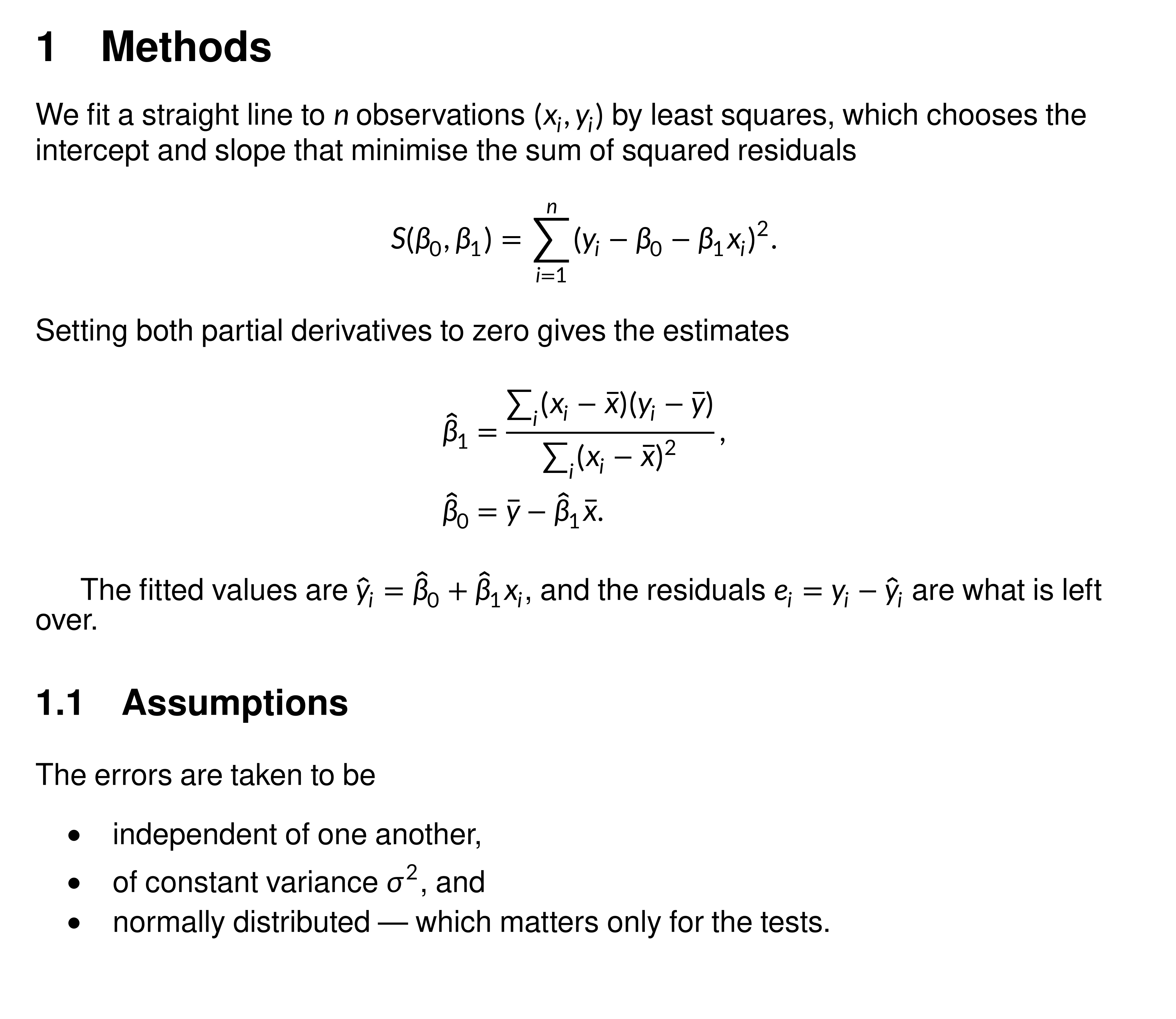
How the body is read
As in LaTeX:
-
Paragraphs. A blank line or
\parstarts a new, indented paragraph.\noindentsuppresses the indent. -
Headings.
\section,\subsectionand\subsubsectionare numbered; starred forms are not. -
Math.
$...$and\(...\)are inline.\[...\],$$...$$,equation,align,gatherandmultlineare centred on their own line. Equations are not numbered. -
Lists and tables.
itemize,enumerateandtabularhold text, with math between$...$. -
Text.
--and---are dashes, quotes are curly, and~is a non-breaking space.\centeringandcentercentre lines.
Problems produce one warning, listing each with its line and column.
Justified text
justify = TRUE fills every line but the last, and
line_break = "optimal" chooses the breaks for the whole
paragraph:
para <- r"(Least squares has a closed form, which is why it was the
method of choice long before computers made iterative fitting cheap. It
is also optimal among unbiased linear estimators when the errors are
uncorrelated with equal variance: the Gauss--Markov theorem.)"
grid.newpage()
grid.latex(para, input_mode = "document", max_width = 5.6 * 72,
           justify = TRUE, line_break = "optimal",
           x = 0.03, y = 0.95, hjust = 0, vjust = 1,
           gp = gpar(fontsize = 11))
Saving a PDF
Use cairo_pdf() so the text can be selected.
latex_dims() gives the height to size the page:
d <- latex_dims(body, input_mode = "document", max_width = 5.5 * 72,
                gp = gpar(fontsize = 11))
height <- as.numeric(d$height) / 72 + 1   # inches, with margins

cairo_pdf("methods.pdf", width = 6.5, height = height)
grid.latex(body, input_mode = "document", max_width = 5.5 * 72,
           x = unit(0.5, "in"), y = unit(1, "npc") - unit(0.5, "in"),
           hjust = 0, vjust = 1, gp = gpar(fontsize = 11))
dev.off()
A document is drawn as one piece and does not flow onto a second page. Split a long one at paragraph breaks and draw each part on its own page.